

composer require digitalzombies/be_filterExtension key:be_filter · Composer:digitalzombies/be_filter · TYPO3: 14 LTS
The record list of TYPO3 can sort and it can search, but it cannot filter: there is no way to say show me the cars of this manufacturer that are still available. EXT:be_filter adds that, declared in TCA next to the columns it filters, with no PHP to write for the usual cases. It remembers what each editor filtered by, lets them save and share a filter, and replaces the column selector with one that can be ordered.
See it in action
Fifty seconds in the Cars listing of EXT:example_fleet: five filters narrow 112 cars down to one, then Reset brings them all back.
- Manufacturer is set to BMW — the dropdown fetches its options as it opens.
- Model now offers only the BMW models; the X5 is picked.
- Fuel takes two values, because the filter is
multiple. - First registration takes the quick range Last year.
- Price is capped at 98,500 with the slider.
- Apply reloads the listing once for all five changes, and one car is left.
- Columns opens the transfer list for the columns of the listing, Reset clears every filter again.
The filter bar
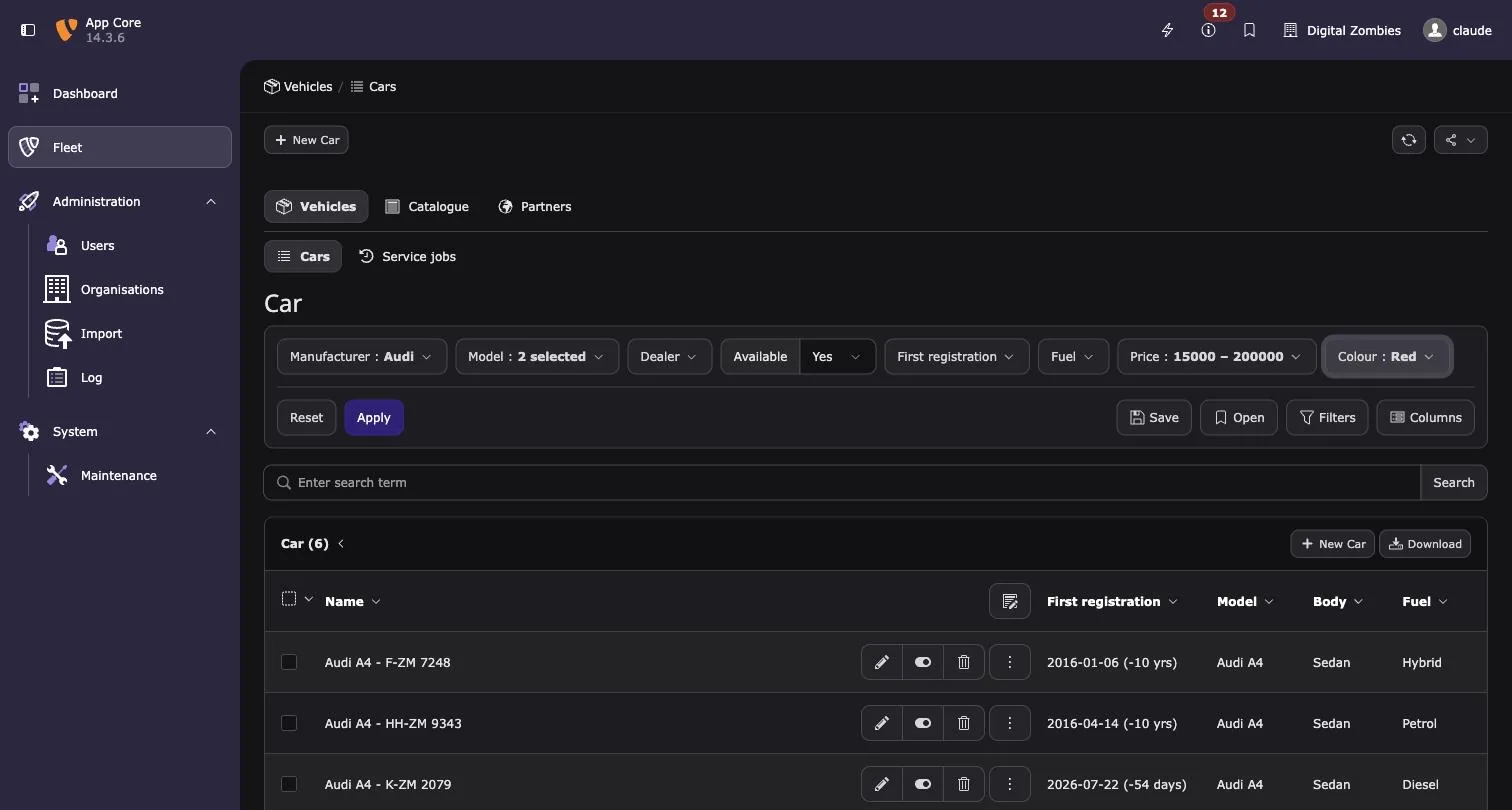
The bar sits above the listing and carries the filters the user has chosen to see, each a dropdown showing its current value. Below a separating line are the actions: Reset on the left, and on the right Save, Open, Filters and Columns. Apply appears between them as soon as a value is changed — values are staged, so several filters can be set before the list reloads once.
A table that declares no filters keeps the bar for its Columns button alone; the Filters button is shown greyed out rather than hidden, so the interface does not change shape from table to table.
Filtering a listing
1. Choosing values
A dropdown carries a search field and the options themselves. Options are never part of the page: they are fetched when the dropdown opens and again while the user types, so a foreign table of any size costs the same page.
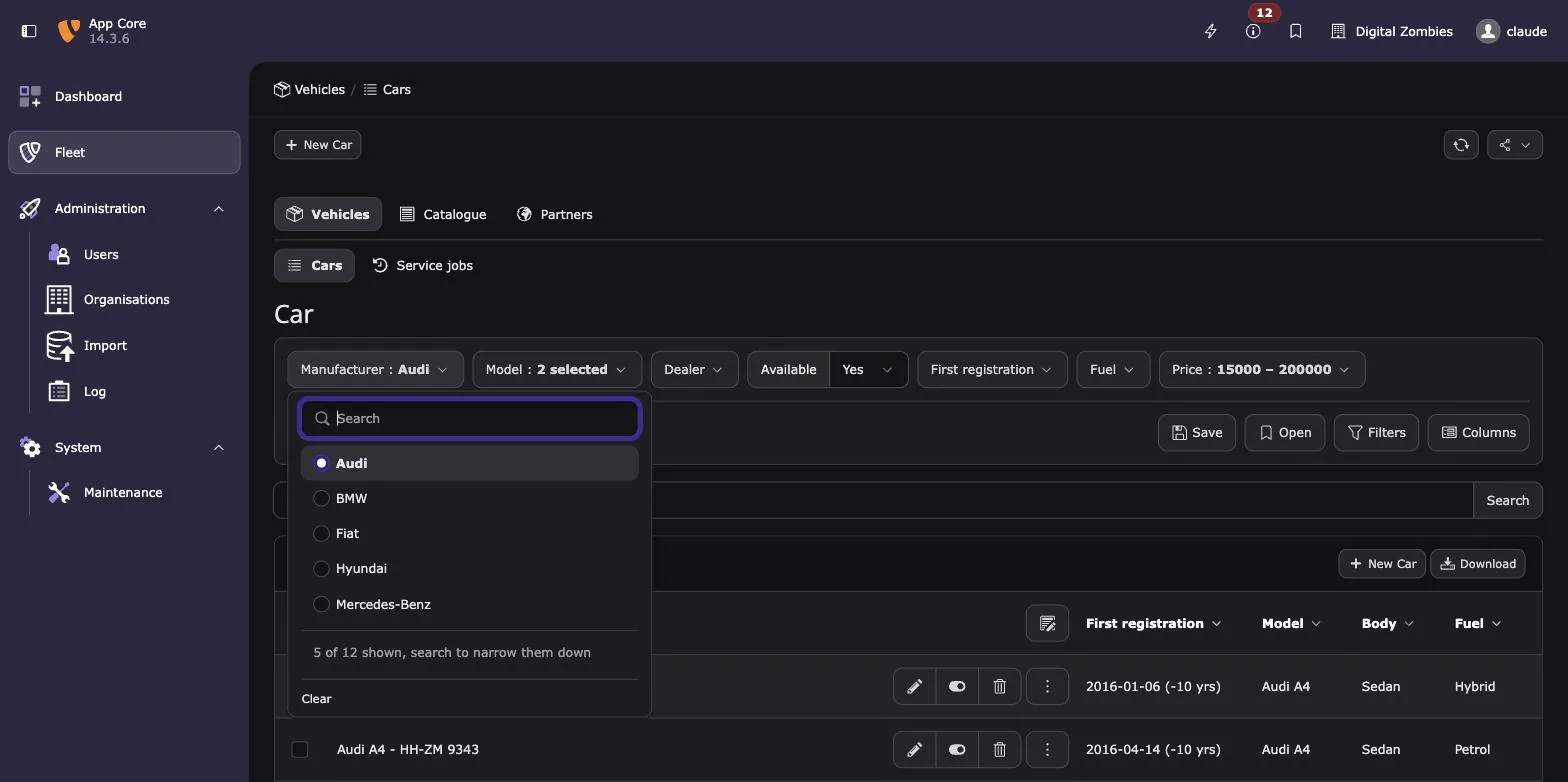
A dropdown offers the first 50 options and says what it is hiding — 5 of 12 shown, search to narrow them down in the screenshot, where the filter asks for a limit of 5. The search runs on the server, across every label field of the foreign table. Values that are already selected always travel with the page, so a chosen record is never hidden by that cut off.
The items of a column follow the page, the same way the record list follows it: what
TCEFORM keeps, removes or renames applies to the filter as well.
TCEFORM.tx_my_table.status.removeItems = draft
TCEFORM.tx_my_table.status.altLabels.done = Finished
2. Filters that narrow each other
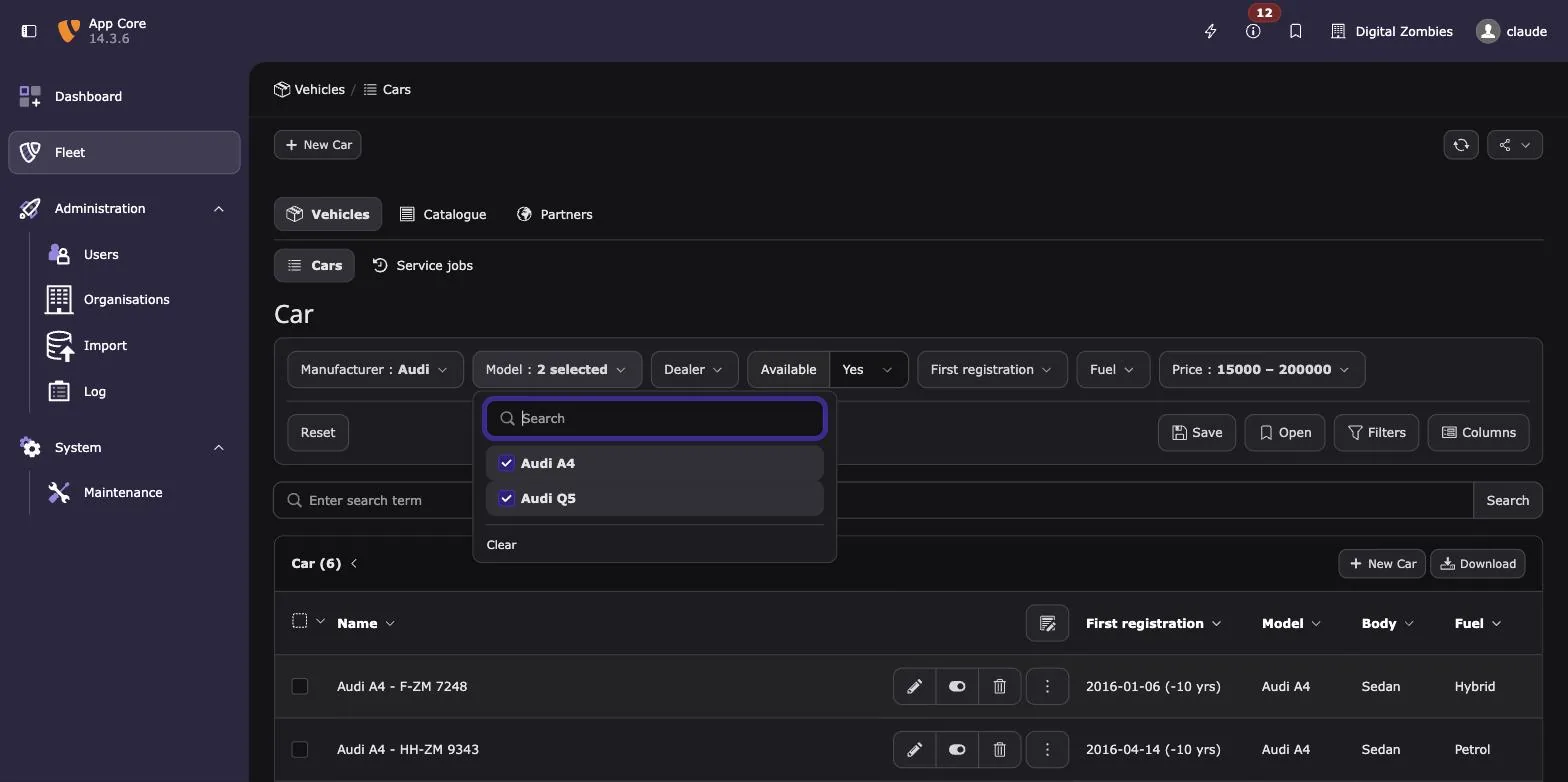
dependsOn makes one filter depend on another. Model offers only the models of the
manufacturer that is selected, so a combination leading to an empty list cannot be picked
in the first place. Changing the parent clears the value of everything depending on it.
It costs one query: the filtered table is joined to the foreign table, so nothing depends
on how many records that foreign table holds. Fields that cannot be joined portably — a
comma separated list, a relation to the table itself — fall back to collecting the values
that occur and matching them. A parent without a value narrows nothing, and a filter may
depend on several parents at once ('dependsOn' => ['manufacturer', 'model']).
3. Ranges of numbers
A number filter is two fields, or a slider when the filter asks for one. A slider with two handles covers a range; with one handle it bounds the range at one end, or asks for the value itself.
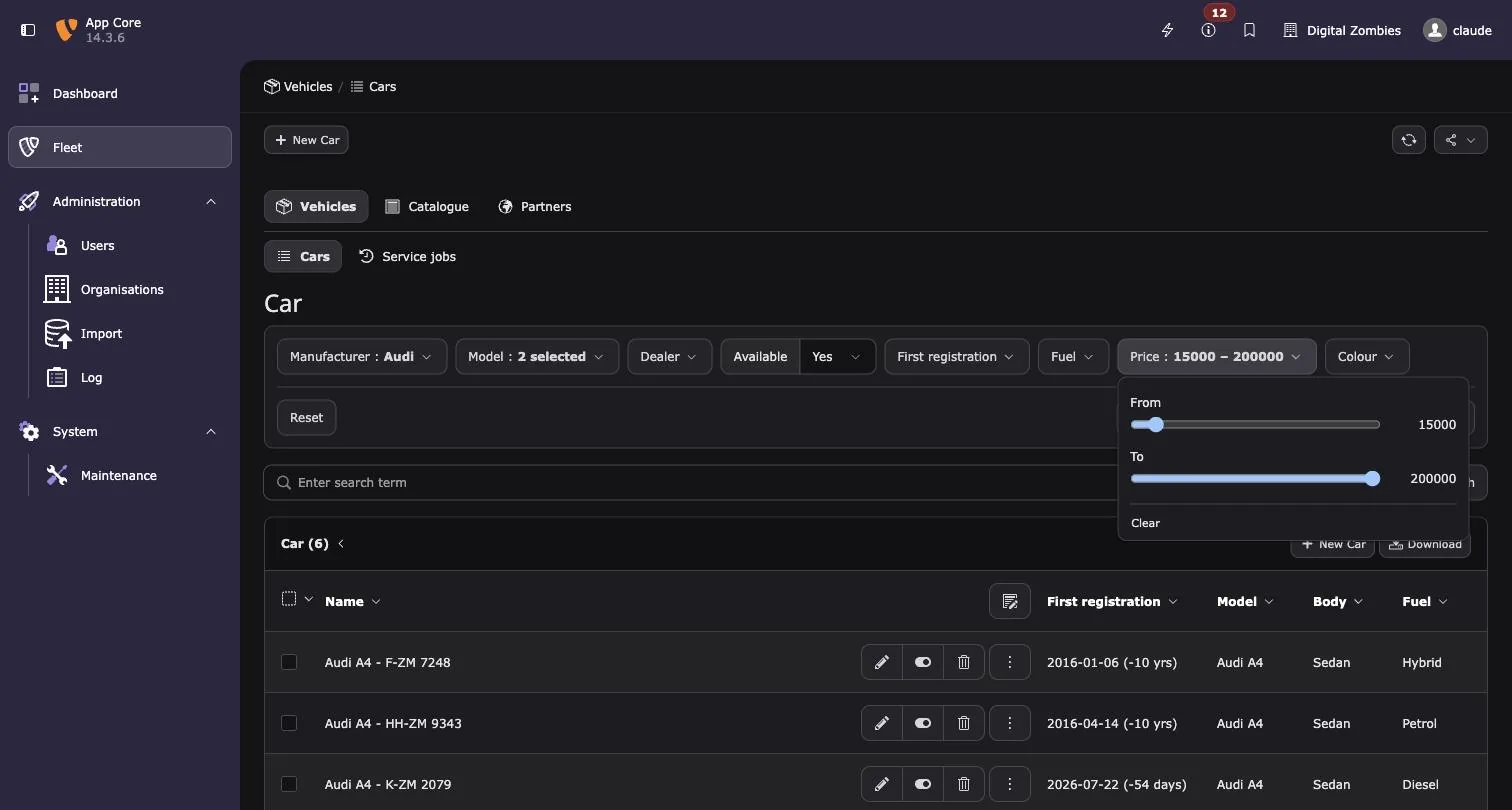
The caption of each end stands above its own track, so every slider is the same length however long its caption is, and the current value stands beside it.
// The number filters of the car table. Bounds and step come from the column,
// both may be overridden here.

// A slider with two handles for the range. It needs both ends: the column only
// says where the prices start, so the filter says where they end.
'price' => ['default' => true, 'step' => 500, 'max' => 200000, 'render' => 'slider'],
// A slider with one handle, bounding the range at the top.
'mileage' => ['max' => 300000, 'step' => 1000, 'render' => 'slider', 'mode' => 'max'],
// A decimal column: the step follows the precision.
'consumption' => ['decimals' => 1, 'step' => 0.1],
mode | The slider has | It filters |
|---|---|---|
range (default) | two handles | from one value to the other |
min | one handle | from the value upwards |
max | one handle | up to the value |
exact | one handle | the value itself |
What the column already declares is reused: min and max default to range.lower /
range.upper, step to slider.step, and decimals to the precision of a decimal
column, whose step then follows it (2 decimals, step 0.01). They are only named to narrow
or refine the column; steps is accepted as a spelling of step. A slider needs both ends
to slide along: where the column names only one of them, the filter names the other,
otherwise the two fields are rendered instead. Either end may be left empty — a range open
on one side filters just as well.
4. Ranges of dates
A date filter offers quick ranges first — 1 week, 1 month, last month, this month, last year, this year — and the two ends below them. Quick ranges are stored by name, not as the dates they resolve to, so a saved filter using this month keeps moving with the calendar.
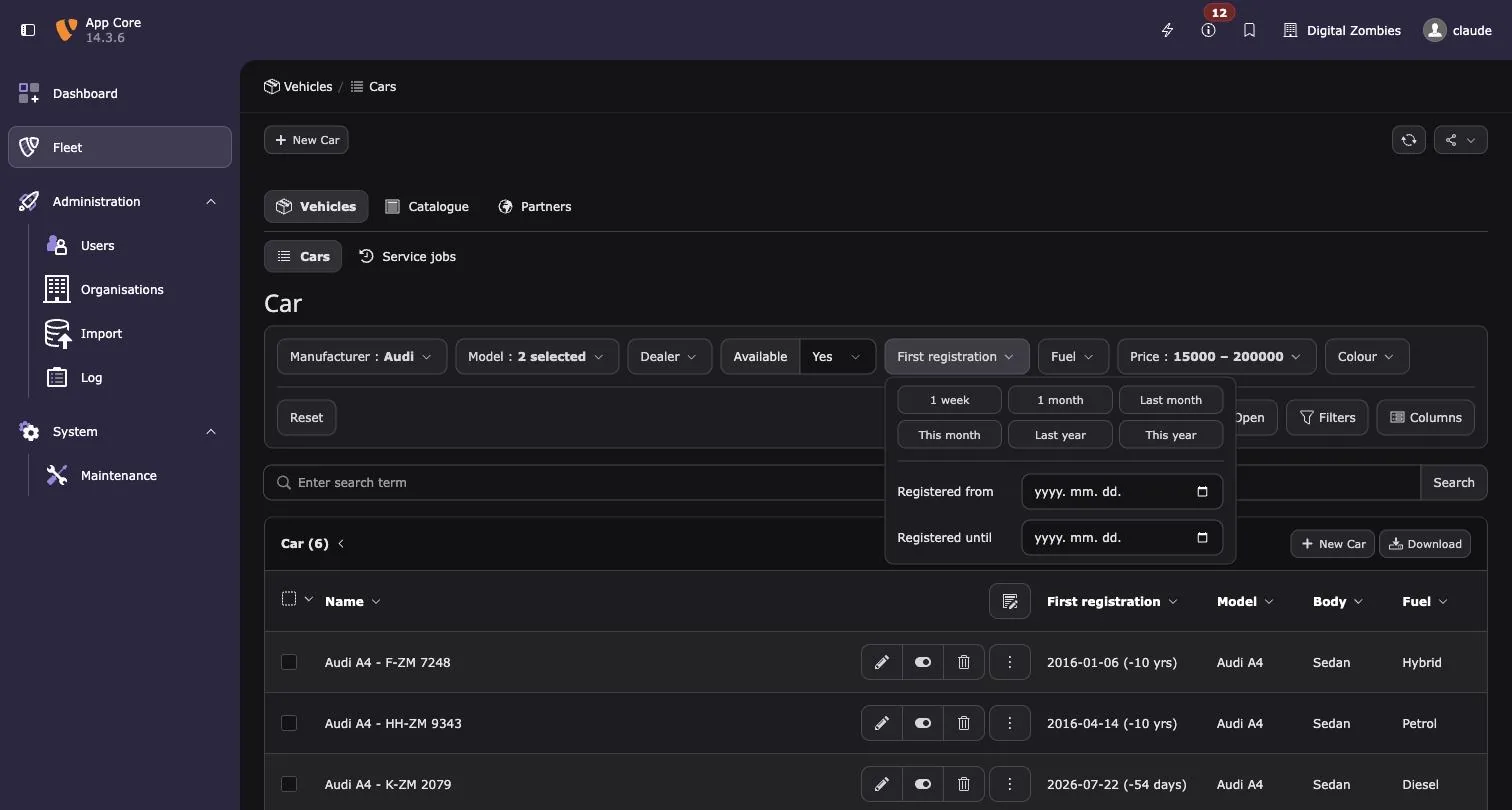
The captions of the two ends can be replaced; the screenshot shows Registered from and Registered until instead of From and To:
// A date filter whose two ends carry captions of their own.
'first_registration' => [
    'default' => true,
    'labels' => ['from' => $language . 'car.registeredFrom', 'to' => $language . 'car.registeredTo'],
],
Quick ranges are configurable as well. Listing presets on a filter replaces the defaults:
the keys given are offered, in that order. true takes a default as it is, false skips
an entry, an array defines or overrides one.
'crdate' => [
    'type' => 'date',
    'presets' => [
        'thisMonth' => true,                                          // a default, unchanged
        'week'      => ['label' => 'LLL:EXT:my_ext/…:last7days'],      // a default, own label
        'quarter'   => ['label' => 'Quarter', 'from' => '-3 months'],  // a new one
        'overdue'   => ['label' => 'Overdue', 'to' => 'yesterday'],    // open at the start
    ],
],
The defaults themselves are replaced the same way for every date filter of the installation:
// ext_localconf.php
$GLOBALS['TYPO3_CONF_VARS']['EXTCONF']['be_filter']['datePresets']['week'] = [
    'label' => 'LLL:EXT:my_ext/…:last7days',
    'from' => '-7 days',
];
A quick range is a label and a range. from and to are relative date expressions of
PHP, the syntax of strtotime(), evaluated against the current day whenever the filter
runs. from opens the range at the start of that day, to closes it at the end of that
day. Leaving one out makes the range open on that side, and 'value' => '-7 days' is short
for a range reaching until now.
| Expression | Resolves to |
|---|---|
-7 days | seven days back |
-1 month | the same day last month |
first day of last month | the 1st of the previous month |
last day of this month | the end of the current month |
monday this week | the start of the current week |
first day of January this year | the 1st of January |
today, now, yesterday | the respective day |
An expression that cannot be parsed is ignored; it never takes the listing down.
5. Saving a filter
Save keeps the current values and the filters the bar is showing, under a name. It is a wizard built on the wizard of the backend itself, so it behaves like the page creation wizard: the name, then who the filter is shared with, then a summary.
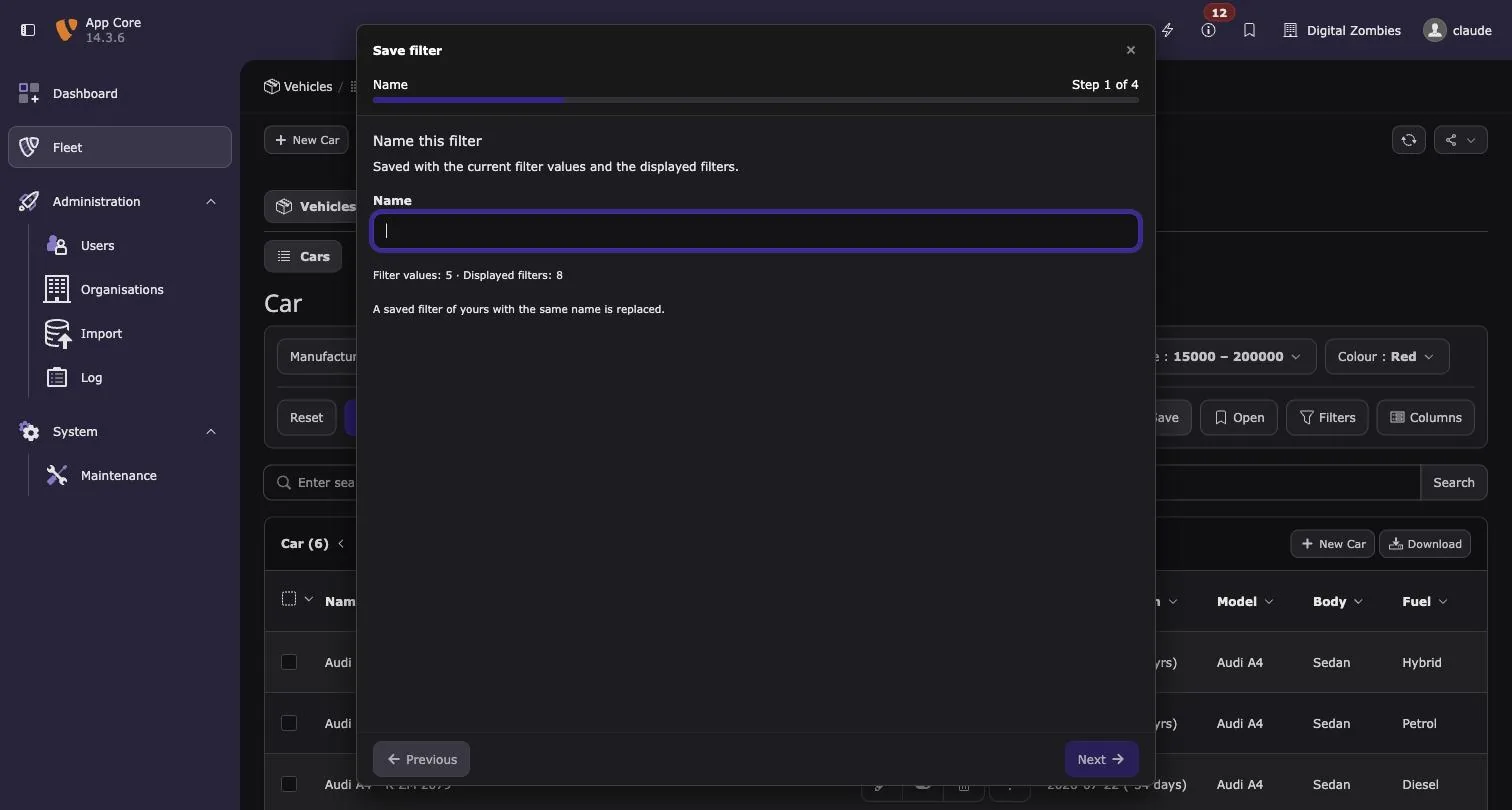
The first step names it and says what is being saved — Filter values: 5 · Displayed filters: 8 — and warns that a saved filter of your own with the same name is replaced.
A saved filter is private, shared with backend groups, or public. Sharing with groups asks for the groups, and the wizard stays incomplete until one is chosen. Everyone may open what is shared with them; only its owner may change or delete it.
Open is a dialog, not a wizard: the saved filters as cards, searchable by name, creator (your own show as Me), date and who they are shared with. Select one and apply, or apply right away with a double click.
A saved filter carries the records it was saved with. Opened by somebody who may not see one of them — a different scope, a permission they do not have, or a record that has since been deleted — the values that no longer resolve are left out instead of filtering the listing down to nothing, and a notice names the filters it happened to. A filter the table no longer has, or the user may not use, is named in the same notice. The listing is scoped on its own, so leaving a value out never shows more than the user may see — and only the values a user can resolve leave the server in the first place.
6. Arranging the bar
Filters and Columns open the same popup: Available on the left, Displayed on the right. Entries are dragged across, and the order on the right becomes the order in the interface. A double click moves an entry over as well. Entries that cannot be switched off — the title column of a table, for example — stay at the top of the right panel.
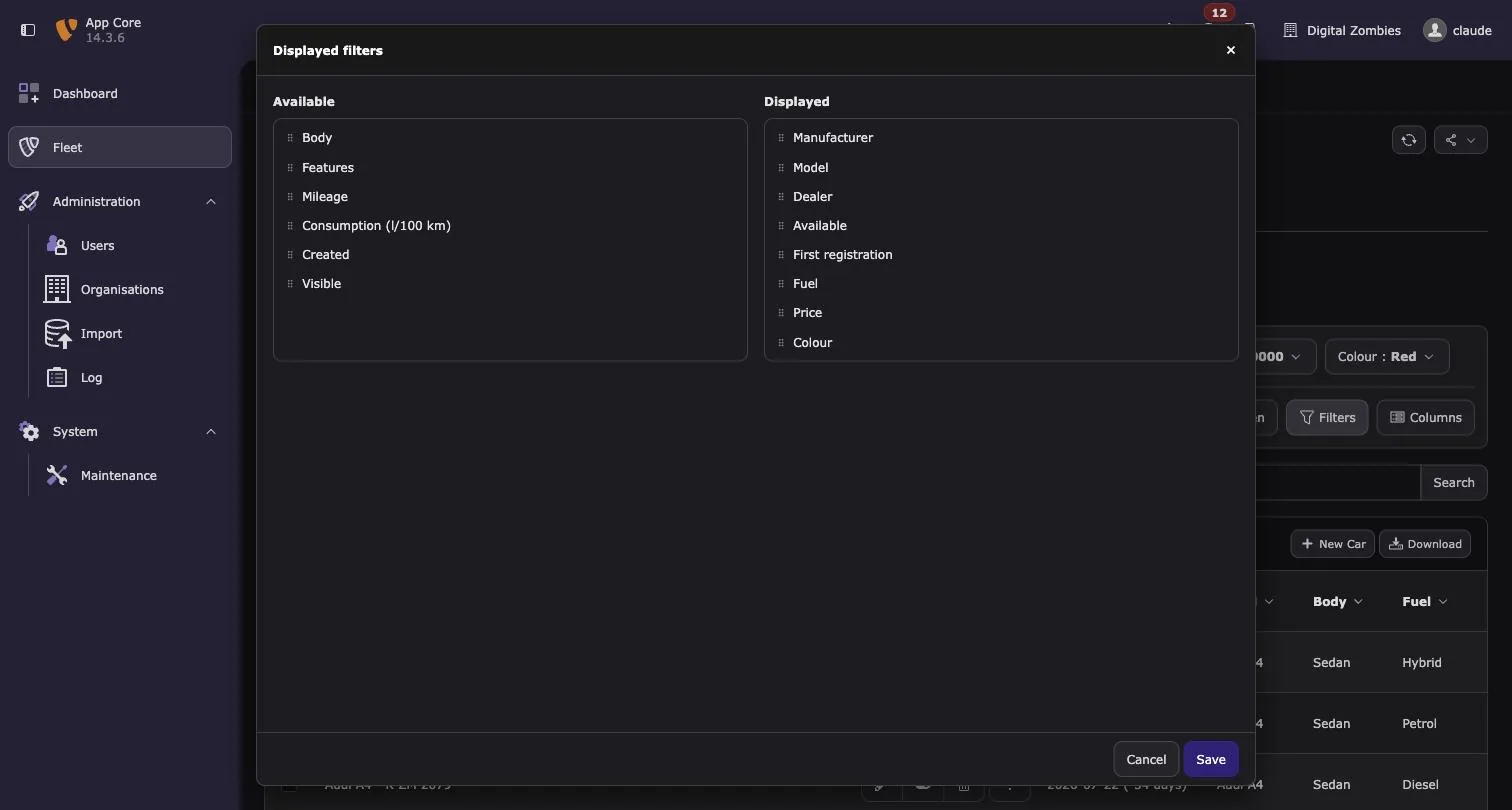
Columns replaces the column selector of the record list, which offers a selection but no order.
What happens behind the scenes
| What | Where |
|---|---|
| The values a user has set, and the filters they display | be_users.uc, module data, under be_filter |
| The columns a user displays | be_users.uc, under list/displayFields, where the record list reads them |
| Saved filters | tx_befilter_preset: owner, table, title, values, displayed filters, sharing (private, groups with a list of backend groups, or public) |
| The constraints on the listing, and the column order | ModifyDatabaseQueryForRecordListingEvent |
| The bar itself | RenderAdditionalContentToRecordListEvent |
| The queries the filters run for their own options | Event\ModifyFilterQueryEvent |
| The scope of saved filters | Event\ModifyPresetQueryEvent |
Scoping beyond TCA
An application that scopes records beyond what TCA describes — a tenant, a client, an organisation — has two events to listen to.
ModifyFilterQueryEvent is dispatched for every query the filters run on their own:
looking up selectable options, and narrowing dependent filters. It hands over the query
builder, the table and the Filter, so the option lists are scoped the same way the
listing is:
#[AsEventListener('my/scope-filter-options')]
public function __invoke(ModifyFilterQueryEvent $event): void
{
    $this->addMyConstraint($event->getQueryBuilder(), $event->getTable());
}
ModifyPresetQueryEvent scopes the saved filters. They are written without the
DataHandler, so a scope of the application has to be named here: setScope() takes a
field of tx_befilter_preset (which the application adds to the table itself) and the
current value. Saved filters are then stamped with that value when they are written, and
only those carrying it are read:
#[AsEventListener('my/scope-presets')]
public function scopePresets(ModifyPresetQueryEvent $event): void
{
    $event->setScope('tenant', $this->tenantContext->getCurrentTenant());
}
Declaring filters
Filters are declared per table, next to ctrl and columns. The type follows the TCA
column, so most filters are one line:
// packages/example-fleet/Configuration/TCA/tx_examplefleet_domain_model_car.php
// $language is the LLL prefix of the extension.
    'filters' => [
        // A relation, offered with a limit of its own: the bar says how many it hides.
        'manufacturer' => ['default' => true, 'optionLimit' => 5],
        // Narrowed by its parent, several values at once.
        'model' => ['default' => true, 'multiple' => true, 'dependsOn' => 'manufacturer'],
        'fuel' => ['default' => true, 'multiple' => true],
        'body' => ['multiple' => true],
        // An MM relation, narrowed by a parent as well.
        'features' => ['multiple' => true, 'dependsOn' => 'manufacturer'],
        // Two parents narrow this one.
        'dealer' => ['multiple' => true, 'dependsOn' => ['manufacturer', 'model']],
        // A checkbox as the yes / no dropdown, which is the default.
        'available' => ['default' => true],
        // A filter type of this extension, see Classes/Filter/Type. It takes the column
        // from the built in select type by answering a higher priority.
        'colour' => [
            'render' => 'swatches',
            'swatches' => [
                'black' => '#1d1d1b',
                'white' => '#f2f2f2',
                'silver' => '#c8ccce',
                'blue' => '#1b4ea0',
                'red' => '#c8102e',
                'green' => '#2e7d32',
            ],
        ],
        // Captions of its own for the two ends of the range.
        'first_registration' => [
            'default' => true,
            'labels' => ['from' => $language . 'car.registeredFrom', 'to' => $language . 'car.registeredTo'],
        ],
        // Bounds and step come from the column, both may be overridden here.
        // A slider with two handles for the range. It needs both ends: the column only
        // says where the prices start, so the filter says where they end.
        'price' => ['default' => true, 'step' => 500, 'max' => 200000, 'render' => 'slider'],
        // A slider with one handle, bounding the range at the top.
        'mileage' => ['max' => 300000, 'step' => 1000, 'render' => 'slider', 'mode' => 'max'],
        // A decimal column: the step follows the precision.
        'consumption' => ['decimals' => 1, 'step' => 0.1],
        // A field without a TCA column needs its type, and a label of its own.
        'crdate' => ['type' => 'date', 'label' => $language . 'car.created'],
        // The same checkbox as a switch instead of the dropdown.
        'hidden' => ['render' => 'checkbox'],
    ],
The type only has to be named for a field that has no TCA column, crdate for example.
| TCA column | Filter | Behaviour |
|---|---|---|
select, category, group, radio | select | Dropdown with a search field. Values come from the items of the column, from its foreign table, or from both. Single values, comma separated lists and MM relations are all supported. A group field is offered only when it allows a single table. |
datetime | date | From / to, with the quick ranges above them. |
number | number | From / to, for whole numbers and decimals alike. input columns with a numeric eval are treated the same. |
check | checkbox | A yes / no dropdown, or a switch with 'render' => 'checkbox'. Checkboxes displaying the unchecked state as the enabled one, hidden, are handled. Only a single checkbox, not a bitmask. |
Everything else is ignored — text above all, which is what the search box of the record list is for.
The keys of a filter
| Key | Meaning |
|---|---|
default | The filter is displayed until the user arranges the bar themselves. |
multiple | Several values can be selected. Select filters only. |
dependsOn | A filter name, or a list of them, narrowing the options of this filter. |
render | checkbox shows a checkbox filter as a switch, slider a number filter as a slider. |
mode | What a slider filters: range, min, max or exact. |
type | Only needed for fields without a TCA column, crdate for example. |
label | Overrides the label of the column. |
labels | Captions of the two ends of a range, from and to. Date and number filters only. |
presets | The quick ranges of a date filter. |
optionLimit | How many options the dropdown offers at once. Default: the setting of the table or installation, else 50. |
min, max | Bounds of a number filter. Default: range.lower / range.upper of the column. |
step | Step of a number filter, steps works as well. Default: slider.step, else 1, else the precision of a decimal. |
decimals | Decimal places of a number filter. Default: precision of a decimal column, else 0. |
A filter type of your own may read further keys of its own — the colour filter below reads
swatches.
Configuration
Three levels, the narrower one winning: the installation, one table, one filter.
<?php
// Every setting has three levels: the installation, one table, one filter.
// The narrower level wins, and for captions it wins per end of the range.

// ext_localconf.php — the default for every table
$GLOBALS['TYPO3_CONF_VARS']['EXTCONF']['be_filter']['autoRefresh'] = true;
$GLOBALS['TYPO3_CONF_VARS']['EXTCONF']['be_filter']['optionLimit'] = 50;
$GLOBALS['TYPO3_CONF_VARS']['EXTCONF']['be_filter']['labels'] = [
    'from' => 'LLL:EXT:my_ext/Resources/Private/Language/locallang.xlf:since',
    'to' => 'LLL:EXT:my_ext/Resources/Private/Language/locallang.xlf:until',
];

// One table decides for itself.
$GLOBALS['TCA']['tx_my_table']['ctrl']['be_filter'] = [
    'autoRefresh' => false,
    'optionLimit' => 200,
    'labels' => ['from' => 'Registered from'],
];

// One filter decides for itself.
$GLOBALS['TCA']['tx_my_table']['filters']['first_registration'] = [
    'labels' => ['from' => 'Registered from', 'to' => 'Registered until'],
];
Who may filter at all is a separate question, and it is answered with user TSconfig. It is inherited from the backend groups of a user, so a group is the place to say it:
mod.be_filter.disabled = 1                         # nobody in this group filters
mod.be_filter.tables.tx_my_table.disabled = 1      # or only this table is off limits
A user who may not filter gets no bar, and the endpoints behind it answer nothing — the bar is not the only way in, so the same check guards every route. This is not the same as the permissions of the table: a user who may not read a table has no bar either, because the record list does not show them the table in the first place.
autoRefresh reloads the listing as soon as a value changes and removes the Apply
button; typing in a range waits until the typing stops rather than sending a request per
keystroke. optionLimit is how many options a dropdown offers before the search has to
narrow them. labels replaces the captions of a range, per end: a table replacing from
keeps what the installation says about to.
Writing your own filter type
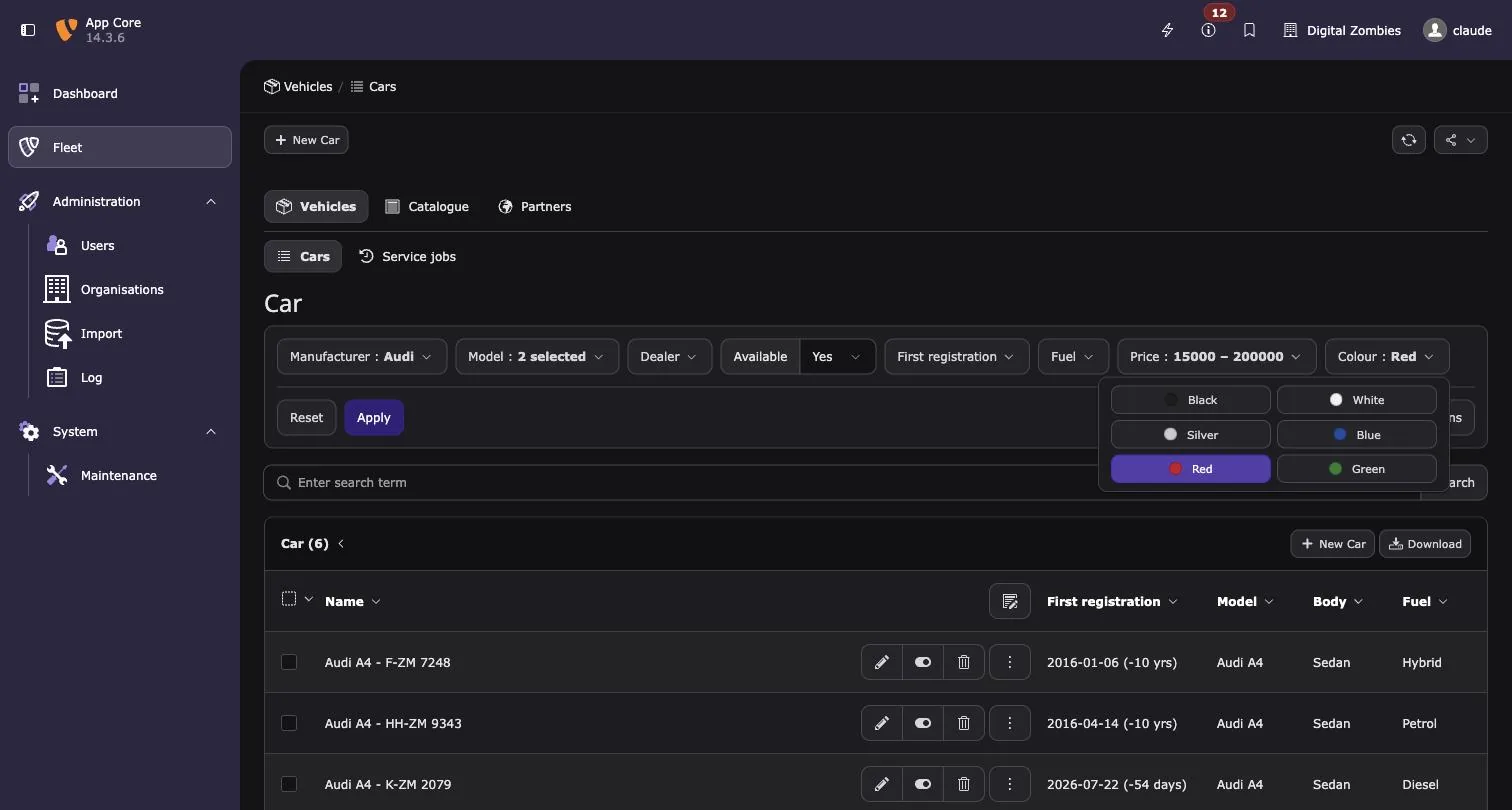
A filter type has two halves: a PHP service that decides which columns it takes over, what it accepts and how it constrains the query, and a JavaScript control that renders it in the bar. The steps below build the colour filter of EXT:example_fleet, which offers the colour of a car as swatches instead of a dropdown.
1. Extend AbstractFilterType
Every type implements FilterTypeInterface. AbstractFilterType answers the optional
methods, so a new type starts from these four:
use DigitalZombies\BeFilter\Filter\Filter;
use DigitalZombies\BeFilter\Filter\Type\AbstractFilterType;
use Doctrine\DBAL\Query\Expression\CompositeExpression;
use TYPO3\CMS\Core\Database\Query\QueryBuilder;

final class MyFilterType extends AbstractFilterType
{
    public function getIdentifier(): string
    {
        // The name of the type, and of its control on the client
    }

    public function matches(array $config, array $definition): bool
    {
        // Whether this type takes over the filter
    }

    public function normalizeValue(mixed $value, Filter $filter): mixed
    {
        // What the filter accepts, NULL when the value constrains nothing
    }

    public function buildConstraint(
        QueryBuilder $queryBuilder,
        Filter $filter,
        mixed $value
    ): string|CompositeExpression|null {
        // The constraint added to the listing
    }
}
All methods of FilterTypeInterface, in the order a filter meets them:
| Method | Fill in? | Default in AbstractFilterType | What it answers, and why |
|---|---|---|---|
getIdentifier() | Required | — | The name of the type. The control registers under the same name with registerFilterType(), and a filter without a TCA column names it as 'type'. The registry keeps one type per identifier. |
getPriority() | Optional | 0 | The order the types are asked in, highest first. The built in types answer 0, so a type that takes a column they would match answers more. |
matches() | Required | — | Whether the type takes over a filter. $config is the TCA column, $definition the entry of the filters section. The first type answering true wins; a definition that names its type is not asked at all. |
buildTypeOptions() | Optional | [] | What the type works out once from TCA, kept on the filter as $filter->typeOptions. It runs when the filters of a table are built, so the other methods read the result instead of parsing TCA again. |
describe() | Optional | $filter->typeOptions | What the control needs on top of name, label, type, multiple and dependsOn. It arrives on this.filter in JavaScript. Override it when typeOptions holds something the browser does not need. |
providesOptions() | Optional | false | Whether the filter offers a list through the options endpoint: the records of the foreign table of the column and its static items, searchable, limited by optionLimit and narrowed by dependsOn. Only then is multiple honoured and the labels of the selected values sent with the page. A type with a list of its own leaves it false and hands the list over with describe(). |
getJavaScriptModule() | Needed for a control of your own | null | The module bringing the control, loaded together with the bar. Without it nothing on the client renders the identifier. |
normalizeValue() | Required | — | What the filter accepts. Values arrive as the control emitted them and pass through here before they are applied or narrow an option list, so this is where anything unexpected is dropped. null means the filter is not set. |
buildConstraint() | Required | — | The constraint on the listing, built from what normalizeValue() returned. Bind values as named parameters of the query builder. null adds nothing. |
The Filter handed to these methods carries table, name, label, multiple,
dependsOn, the TCA column as config, typeOptions and optionLimit, and helpers that
describe how the field stores its values: getForeignTable(), getItems(),
getMmTable(), isMultiValue(), isInverted(), asCheckbox() and
getDateStorageFormat(). For a range, AbstractFilterType::rangeLabels() returns the
captions of both ends, already resolved.
The colour filter fills the methods in like this:
matches()answers only for aselectcolumn whose filter asks for'render' => 'swatches', andgetPriority()answers10, so it is asked before the built in dropdown that would take the column otherwise.buildTypeOptions()pairs the items of the column with the colours of the definition, anddescribe()hands exactly that list to the control.normalizeValue()keeps only colours the column knows,buildConstraint()turns them into anIN.
// packages/example-fleet/Classes/Filter/Type/ColourSwatchFilterType.php
<?php

declare(strict_types=1);

namespace DigitalZombies\ExampleFleet\Filter\Type;

use DigitalZombies\BeFilter\Filter\Filter;
use DigitalZombies\BeFilter\Filter\Type\AbstractFilterType;
use Doctrine\DBAL\Query\Expression\CompositeExpression;
use TYPO3\CMS\Core\Database\Connection;
use TYPO3\CMS\Core\Database\Query\QueryBuilder;
use TYPO3\CMS\Core\Localization\LanguageService;

/**
 * A filter type of an application: the colour of a car as swatches instead of a dropdown.
 * Nothing registers it by hand, the container collects it, see the README of be_filter.
 */
final class ColourSwatchFilterType extends AbstractFilterType
{
    public function getIdentifier(): string
    {
        return 'colourSwatches';
    }

    /**
     * The column belongs to the built in select type, so this one has to be asked first.
     */
    public function getPriority(): int
    {
        return 10;
    }

    public function matches(array $config, array $definition): bool
    {
        return (string)($config['type'] ?? '') === 'select'
            && (string)($definition['render'] ?? '') === 'swatches';
    }

    /**
     * @param array<string, mixed> $definition
     * @param array<string, mixed> $config
     * @return array<string, mixed>
     */
    public function buildTypeOptions(array $definition, array $config): array
    {
        $colours = is_array($definition['swatches'] ?? null) ? $definition['swatches'] : [];

        $swatches = [];
        foreach ((array)($config['items'] ?? []) as $item) {
            $value = (string)($item['value'] ?? '');
            if ($value === '' || !isset($colours[$value])) {
                continue;
            }
            $swatches[] = [
                'value' => $value,
                'label' => $this->getLanguageService()->sL((string)($item['label'] ?? '')) ?: $value,
                'colour' => (string)$colours[$value],
            ];
        }

        return ['swatches' => $swatches];
    }

    /**
     * @return array<string, mixed>
     */
    public function describe(Filter $filter): array
    {
        return ['swatches' => $filter->typeOptions['swatches'] ?? []];
    }

    /**
     * @return string[]|null
     */
    public function normalizeValue(mixed $value, Filter $filter): ?array
    {
        $known = array_column((array)($filter->typeOptions['swatches'] ?? []), 'value');
        $chosen = array_values(array_intersect(
            array_map(static fn(mixed $entry): string => is_scalar($entry) ? (string)$entry : '', (array)$value),
            $known
        ));

        return $chosen === [] ? null : $chosen;
    }

    public function buildConstraint(
        QueryBuilder $queryBuilder,
        Filter $filter,
        mixed $value
    ): string|CompositeExpression|null {
        $chosen = (array)$value;
        if ($chosen === []) {
            return null;
        }

        return $queryBuilder->expr()->in(
            $filter->table . '.' . $filter->name,
            $queryBuilder->createNamedParameter($chosen, Connection::PARAM_STR_ARRAY)
        );
    }

    public function getJavaScriptModule(): ?string
    {
        return '@digitalzombies/example-fleet/colour-filter.js';
    }

    private function getLanguageService(): LanguageService
    {
        return $GLOBALS['LANG'];
    }
}
2. Tag the service
The container collects every service implementing FilterTypeInterface by the tag
be_filter.filter_type, so nothing is registered by hand. _instanceof applies only to the
services of the Services.yaml it stands in, so the extension adding a type tags it
itself:
# packages/example-fleet/Configuration/Services.yaml
services:
  _defaults:
    autowire: true
    autoconfigure: true
    public: false

  # Filter types are collected by tag, and a tag from another extension does not reach
  # this file: an extension adding a type tags it itself.
  _instanceof:
    DigitalZombies\BeFilter\Filter\Type\FilterTypeInterface:
      tags: ['be_filter.filter_type']

  DigitalZombies\ExampleFleet\:
    resource: '../Classes/*'
3. Write the control
The control is a Lit element built on AbstractFilterControl. It renders into the page
itself rather than a shadow root, so the classes of the backend style it.
| Member | Fill in? | Default in AbstractFilterControl | What it does, and why |
|---|---|---|---|
renderControl() | Required | throws an error | The content of the control, placed in the dropdown unless renderShell() is replaced. |
summary() | Optional | "" | The current value in words, shown on the button next to the label. |
opened(event) | Optional | does nothing | Called when the dropdown opens — the place for a control that loads its values on demand. |
renderShell(content) | Optional | the dropdown: a button with label and summary, content in its menu | A control that is not a dropdown returns content alone, as the checkbox switch does. |
emit(value) | Call it | dispatches be-filter-change | Hands a value to the bar, null clears the filter. What is emitted passes normalizeValue() on the server, so the control does not validate anything. |
this.filter | Read it | — | name, label, type, multiple, dependsOn, and whatever describe() returned. A type providing options also receives selected. |
this.value | Read it | null | The current value, null while the filter is not set. |
Two lines at the end of the module make the control available: customElements.define()
names the element, and registerFilterType() binds it to the identifier — the same string
getIdentifier() returns. Modules load asynchronously, so a control may register after the
bar has rendered; the bar listens for registrations and renders again.
Build a control out of what the backend already ships rather than styling it yourself: a
checkbox in a form-check form-check-type-toggle is the one the record list puts in front
of a row, form-check-type-card is the card of the wizards, and a control of the bar goes
into be-filter-control. A control may be rendered inside a modal, where the stylesheet of
be_filter is not loaded at all, so a class of the core carries further than one of your
own.
// packages/example-fleet/Resources/Public/JavaScript/colour-filter.js
import { html } from "lit";
import { AbstractFilterControl, registerFilterType } from "@digitalzombies/be_filter/filter-types.js";

const DOT = "display:inline-block;inline-size:.8rem;block-size:.8rem;border-radius:50%;"
  + "margin-inline-end:.4rem;border:1px solid rgba(0, 0, 0, .25);flex:0 0 auto";

/**
 * The colour of a car as swatches, the control of the "colourSwatches" type.
 */
class ColourSwatchFilter extends AbstractFilterControl {
  get swatches() {
    return this.filter.swatches ?? [];
  }

  // The bar hands NULL to a filter that is not set.
  get selection() {
    return this.value ?? [];
  }

  renderControl() {
    return html`
      <div class="be-filter-grid">
        ${this.swatches.map((swatch) => this.renderSwatch(swatch))}
      </div>`;
  }

  renderSwatch(swatch) {
    const chosen = this.selection.includes(swatch.value);

    return html`
      <button
        type="button"
        class="btn btn-sm ${chosen ? "btn-primary" : "btn-default"}"
        style="display:flex;align-items:center;text-align:start"
        aria-pressed=${chosen ? "true" : "false"}
        @click=${() => this.toggle(swatch.value)}
      >
        <span style="${DOT};background-color:${swatch.colour}"></span>
        <span>${swatch.label}</span>
      </button>`;
  }

  toggle(value) {
    const chosen = this.selection.includes(value)
      ? this.selection.filter((entry) => entry !== value)
      : [...this.selection, value];

    this.emit(chosen.length > 0 ? chosen : null);
  }

  summary() {
    const chosen = this.selection;

    return this.swatches
      .filter((swatch) => chosen.includes(swatch.value))
      .map((swatch) => swatch.label)
      .join(", ");
  }
}

customElements.define("example-fleet-colour-filter", ColourSwatchFilter);
registerFilterType("colourSwatches", "example-fleet-colour-filter");

export { ColourSwatchFilter };
4. Make the module resolvable
getJavaScriptModule() returns a module specifier, which the backend has to resolve.
Configuration/JavaScriptModules.php maps the prefix to the folder of the extension and
names be_filter as a dependency, so @digitalzombies/be_filter/filter-types.js resolves
as well:
// packages/example-fleet/Configuration/JavaScriptModules.php
<?php

return [
    'dependencies' => [
        'backend',
        'core',
        'be_filter',
    ],
    'imports' => [
        '@digitalzombies/example-fleet/' => 'EXT:example_fleet/Resources/Public/JavaScript/',
    ],
];
5. Use it on a column
The filter asks for the swatches and names the colours buildTypeOptions() reads. Flush
the caches afterwards, since the types are collected by the container:
// The car column handed to the filter type of the application. It takes the column
// from the built in select type by answering a higher priority.
'colour' => [
    'render' => 'swatches',
    'swatches' => [
        'black' => '#1d1d1b',
        'white' => '#f2f2f2',
        'silver' => '#c8ccce',
        'blue' => '#1b4ea0',
        'red' => '#c8102e',
        'green' => '#2e7d32',
    ],
],
Replacing a built in type
The four built in types are written exactly this way: each brings its own module
(select-filter.js, date-filter.js, number-filter.js, checkbox-filter.js), defines
its element, registers it, and its type names that module. The bar itself knows no type by
name — it asks the registry which control renders a filter:
// packages/be_filter/Classes/Filter/Type/CheckboxFilterType.php — a built in type
// is written exactly like one an extension adds.
<?php

declare(strict_types=1);

namespace DigitalZombies\BeFilter\Filter\Type;

use DigitalZombies\BeFilter\Filter\Filter;
use TYPO3\CMS\Core\Database\Connection;
use TYPO3\CMS\Core\Database\Query\QueryBuilder;

/**
 * A single checkbox, offered as a yes / no dropdown or as a switch.
 */
final class CheckboxFilterType extends AbstractFilterType
{
    public function getIdentifier(): string
    {
        return 'checkbox';
    }

    public function matches(array $config, array $definition): bool
    {
        // Several items are a bitmask, which is not a single yes or no.
        return (string)($config['type'] ?? '') === 'check' && count((array)($config['items'] ?? [[]])) <= 1;
    }

    public function buildTypeOptions(array $definition, array $config): array
    {
        return ['checkbox' => (string)($definition['render'] ?? '') === 'checkbox'];
    }

    public function normalizeValue(mixed $value, Filter $filter): ?string
    {
        $value = is_scalar($value) ? (string)$value : '';

        if ($filter->asCheckbox()) {
            return $value === '1' ? '1' : null;
        }

        return in_array($value, ['0', '1'], true) ? $value : null;
    }

    public function buildConstraint(QueryBuilder $queryBuilder, Filter $filter, mixed $value): ?string
    {
        $value = (string)$value;
        if (!in_array($value, ['0', '1'], true)) {
            return null;
        }

        $checked = $value === '1';
        if ($filter->isInverted()) {
            $checked = !$checked;
        }

        return $queryBuilder->expr()->eq(
            $filter->table . '.' . $filter->name,
            $queryBuilder->createNamedParameter($checked ? 1 : 0, Connection::PARAM_INT)
        );
    }

    public function getJavaScriptModule(): ?string
    {
        return '@digitalzombies/be_filter/checkbox-filter.js';
    }
}
A type of your own answering an identifier that is already taken, with a higher priority, takes it over: the registry keeps one type per identifier, so the control it replaces is not even loaded.
final class MySelectFilterType extends AbstractFilterType
{
    public function getIdentifier(): string
    {
        return 'select';          // the name of the built in type
    }

    public function getPriority(): int
    {
        return 10;                // built in types answer 0
    }

    public function getJavaScriptModule(): ?string
    {
        return '@my-vendor/my-ext/select-filter.js';
    }

    // … matches(), normalizeValue() and buildConstraint() as for any other type
}
The control is replaced the same way: registering another tag under an identifier replaces what was registered before, and the module of the winning type is the one that is loaded.
Requirements and installation
| Requirement | Version |
|---|---|
| TYPO3 | 14.3 and newer |
| PHP | 8.2 and newer |
| Dependencies | typo3/cms-backend and typo3/cms-core only |
The controls are built on Lit, which the TYPO3 backend already ships, so there is nothing to build. The extension works in every module that renders the record list, the Records module included.
composer require digitalzombies/be_filter
vendor/bin/typo3 extension:setup
extension:setup creates tx_befilter_preset, the table of the saved filters. Declare the
filters of a table afterwards and flush the caches: the bar appears above its listing.
Limits
- The filter bar belongs to the single table view. In the multi table listing the record list keeps its own column selector.
foreign_table_whereanditemsProcFuncof a column are not evaluated. Options are the records of the foreign table and the static items of the column. OfTCEFORM, thekeepItems,removeItemsandaltLabelsof a column are followed;addItemsis not — an item no record carries would filter to nothing.- Not covered so far: checkboxes with several items (a bitmask) and free text. Text is left to the search box of the record list on purpose.
Tests
Two suites, both without a TYPO3 instance: the PHP one covers the classes that decide what a filter accepts and how a range is resolved, the JavaScript one the logic of the components.
# PHP, no TYPO3 instance needed
ddev exec vendor/bin/phpunit -c packages/be_filter/phpunit.xml.dist

# JavaScript, the specifiers are stubbed by a loader
ddev exec bash -c 'node --import ./packages/be_filter/Tests/JavaScript/register.mjs \
  --test packages/be_filter/Tests/JavaScript/*.test.mjs'
The test files are named one by one on purpose: handed a directory, the runner imports it
as a module and stops with ERR_UNSUPPORTED_DIR_IMPORT.
The JavaScript modules import lit, @typo3/… and ~labels/…, which resolve only inside
the backend. Tests/JavaScript/loader.mjs maps those specifiers to small stubs in
Tests/JavaScript/stubs/, so the modules import in plain Node; Node 18 or newer is needed,
which the DDEV container has.
The constraints the types build are covered too: Tests/Unit/QueryBuilderTrait hands them
a query builder that writes down what it is asked for, so a constraint is asserted as a
string without a database. What reads from the database — OptionProvider,
PresetRepository — needs a real one and belongs in a functional suite.
The code follows the coding standards of the TYPO3 core, enforced by
typo3/coding-standards:
ddev exec vendor/bin/php-cs-fixer fix --dry-run --diff   # what would change
ddev exec vendor/bin/php-cs-fixer fix                    # change it